
Guide
How to share video to Instagram Stories
An Instagram Story now plays video up to 60 seconds as a single clip. to Stories gives you a proper trimmer, so you can cut any video down to the part worth sharing and send it straight to your Story.
Instagram changed Story video in 2022. It used to chop anything longer than 15 seconds into separate cards; now a Story plays one continuous clip of up to 60 seconds. Either way, most clips still need trimming down to the moment that actually matters.
Trimming inside Instagram is fiddly and imprecise. to Stories gives you a proper trimmer with a zoomable timeline, so you can land on exactly the right few seconds. It stays fast even with long source videos, which makes it easy to pull a highlight out of a recording while you are still out and about.
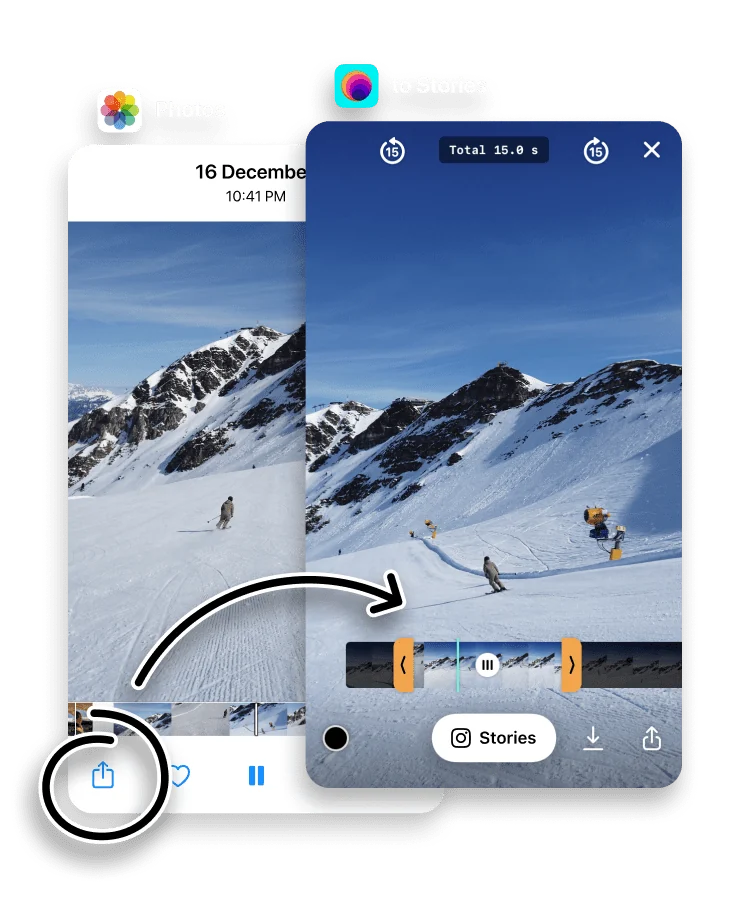
Open the iPhone Photos app, choose a video and tap the Share button.


Tap to Stories in the Share Sheet.

Trim the clip to 60 seconds or less. Zoom the timeline in or out to navigate a longer video.

Done. to Stories sends your video straight to Instagram Stories. You can share this way from any app on your iPhone.

How long can a Story video be?
An Instagram Story plays video up to 60 seconds long, and since a 2022 change it runs as one continuous clip rather than separate 15-second cards. A clip longer than 60 seconds is trimmed, so it is worth choosing which 60 seconds your audience sees rather than leaving that to Instagram. The Instagram Story size guide lists the full video specs.
to Stories vs trimming inside Instagram
Instagram does let you shorten a Story clip, but the handles are small and the preview is coarse, so it is hard to land on an exact moment. The to Stories trimmer is built for it:
- A zoomable timeline. Zoom in for frame-level accuracy, out to scan a long recording.
- Original quality. The trimmed clip is sent at its source quality, so Instagram's only compression is the usual upload pass.
- Any source. Trim clips you recorded, saved from other apps, or downloaded, all from your Photos library.
Sharing a video longer than 60 seconds
To post a longer recording in full, trim it into parts of 60 seconds or less and share each one. Instagram plays them back to back, so a two-minute moment becomes two Story frames that run in sequence.
Frequently asked questions
How long can a video be in an Instagram Story?
An Instagram Story plays video for up to 60 seconds as one continuous clip. Anything longer is trimmed or split across extra Story frames, so cutting it to length first keeps you in control of what plays.
Can I post a video longer than 60 seconds?
Yes. Trim it into parts of 60 seconds or less and share them one after another. Instagram plays them as back-to-back Story frames.
Does trimming reduce the video quality?
No. to Stories keeps the original quality when it sends the trimmed clip to Instagram.
Which videos can I share?
Any video in your iPhone Photos library, including clips you have recorded or saved from other apps.
How do I trim a long video for my Story?
Share the video to to Stories, then drag the timeline handles to the section you want. Zoom the timeline in for frame-level accuracy on a long recording.
Why is my Story video cut off?
Instagram trims Story video to 60 seconds. If a clip runs longer, trim it to 60 seconds or less in to Stories first, so the cut lands where you want it.