
Guide
How to share photos to Instagram Stories
Posting an old photo to your Instagram Story usually means screenshots and cropping. With to Stories you can send any photo from your camera roll straight to Stories in two taps.
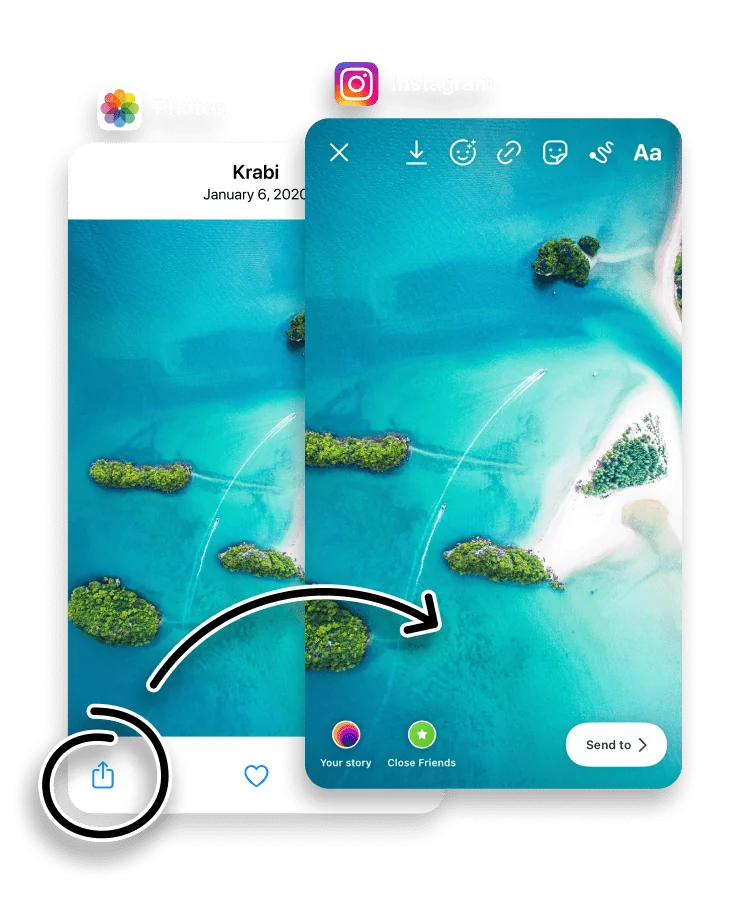
Instagram lets you add a camera-roll photo to a Story, but older or non-vertical photos get awkwardly cropped to fit the 9:16 canvas, and scrolling your whole library inside Instagram is slow. Sharing through to Stories keeps you in the Photos app, where finding the right shot is easy.
to Stories sizes the photo for the vertical Story canvas and opens it in the Instagram Stories composer, so you can add stickers or text and post. It is the quickest way to re-share a memory or post a photo that was never taken in Story format.
Open the iPhone Photos app, pick a photo and tap the Share button.


Choose to Stories in the Share Sheet.

Done. to Stories sends your photo straight to Instagram Stories with zero friction, and you can share the same way from any app on your iPhone.

How to post an old photo without cropping it
Instagram builds Stories around a tall 9:16 frame, so a photo that is square, landscape, or simply older than the Story format rarely fits cleanly. Add one inside Instagram and it is cropped to fill the screen, and you do not always choose which edges are cut.
to Stories works the other way around. It fits the whole photo to the 1080 x 1920 Story canvas and lets you set the background and move the photo, so nothing important is lost off the edge. An old or full-size photo stays whole, framed rather than cropped.
to Stories vs adding a photo inside Instagram
Both can put a photo on your Story, but the result is different:
- Finding the photo is faster. You pick it in the Photos app, with search, albums and memories to hand, instead of scrolling your library inside Instagram.
- The photo is fitted, not cropped. A non-vertical photo sits on a background you choose rather than being trimmed to fill the frame.
- Quality is kept. to Stories passes the full-resolution photo to Instagram, so the only compression is Instagram's usual upload pass.
- It is one habit. The same Share step also sends videos, collages, web pages and more to your Story.
If you select several photos before tapping Share, to Stories arranges them into a collage instead of a single photo. The collage guide covers that in full.
Frequently asked questions
Will my photo be cropped to fit the Story?
to Stories fits the photo to the 9:16 Story canvas. You can change the background and reposition the photo so nothing important is cut off.
Can I share several photos at once?
Yes. Select multiple photos before you tap Share and to Stories arranges them into a collage instead of a single photo.
Does sharing this way lower the photo quality?
No. to Stories passes the full-resolution photo through to Instagram.
Is to Stories free?
Yes. to Stories is free to download and use, with an optional Pro subscription that unlocks every feature.
How do I post a full photo to my Instagram Story without cropping?
Share the photo through to Stories rather than adding it inside Instagram. to Stories fits the whole photo to the Story canvas and lets you adjust the background and position, so you post the entire image instead of a cropped slice.
Why does Instagram crop my photos in Stories?
Instagram Stories use a fixed 9:16 frame, so a photo that is not that shape is cropped to fill it. Fitting the photo to the canvas first, in to Stories, keeps the whole image.